Policy Management
Policy Management
1. SHIELDrive Policy
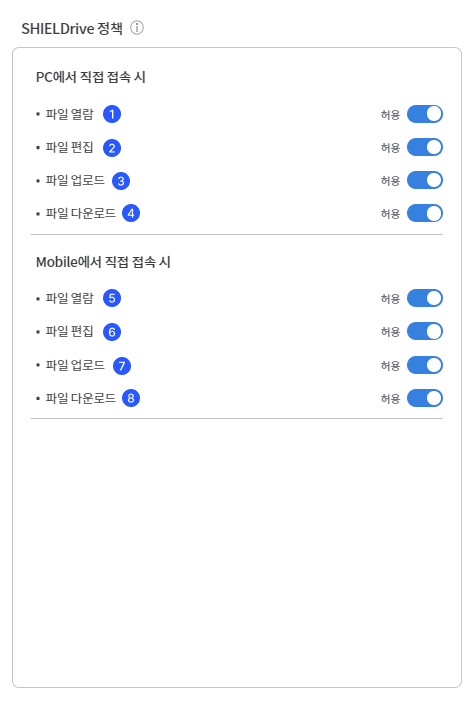
Users can set permissions when they directly access the SHIELDrive page.

- [When accessing from PC]
- When accessing the SHIELDrive page on a PC, you can set the file viewing permissions.
- When accessing the SHIELDrive page on a PC, you can set whether file editing is allowed. If file viewing is blocked, editing will be automatically blocked.
- When accessing the SHIELDrive page on a PC, you can set the file upload options.
- Set the file download options when accessing the SHIELDrive page on the PC.
- [When accessing from mobile]
- When accessing the SHIELDrive page on mobile, you can set the file viewing permissions.
- When accessing the SHIELDrive page on mobile, you can set whether file editing is allowed. If file viewing is blocked, editing will be automatically blocked.
- Set the file upload option when accessing the SHIELDrive page on mobile.
- Set the file download option when accessing the SHIELDrive page on mobile.
2. Teams Integration Policy
You can set permissions when using the SHIELDrive App and Tab integrated with Teams.
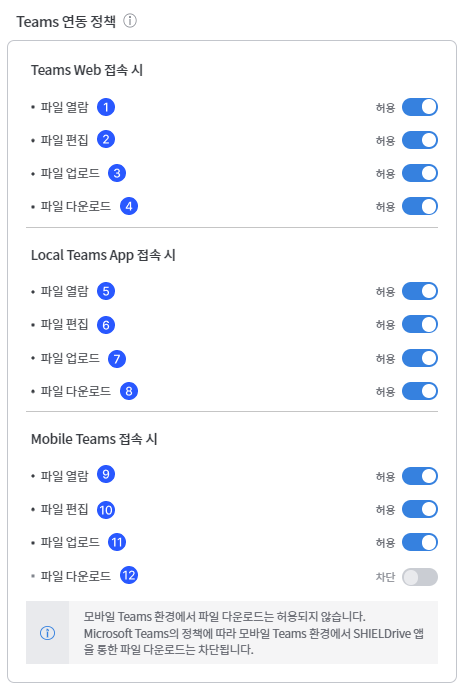
- [When accessing Teams Web]
- When logging into the Teams web page, you can set whether to allow viewing of files uploaded to SHIELDrive.
- When logging in to the Teams web page, you can set whether to edit files uploaded to SHIELDrive. If file viewing is blocked, editing will be automatically blocked.
- When logging into the Teams web page, you can set whether to upload files uploaded to SHIELDrive.
- When logging into the Teams web page, you can set whether to download files uploaded to SHIELDrive.
- [When accessing the Local Teams App]
- When logging in with the Teams App installed on the PC, you can set the viewing permissions for files uploaded to SHIELDrive.
- When logging in with the Teams App installed on the PC, you can set whether to edit files uploaded to SHIELDrive. If file viewing is blocked, editing will be automatically blocked.
- When logging in with the Teams App installed on the PC, you can set whether to upload files uploaded to SHIELDrive.
- When logging in with the Teams App installed on the PC, you can set whether to download files uploaded to SHIELDrive.
- [When accessing Mobile Teams]
- When logging into Teams on mobile, you can set the viewing permissions for files uploaded to SHIELDrive.
- When logging into Teams on mobile, you can set whether to edit files uploaded to SHIELDrive. If file viewing is blocked, editing will be automatically blocked.
- When logging into Teams on mobile, you can set whether to upload files uploaded to SHIELDrive.
- When logging into Teams on mobile, file downloads are blocked according to Microsoft Teams policy.